Smart Invoices: Early Payment Discounts and Late Fees in Crypto Billing
Encode early payment discounts and late fees in crypto smart invoices — payment terms on hosted pay pages, webhook payloads, and B2B collections best practices.
Do this next
Create a crypto invoice
- Quote the invoice in fiat.
- Client pays USDC, USDT, or EURC.
- Funds settle to a wallet you already control.
TL;DR
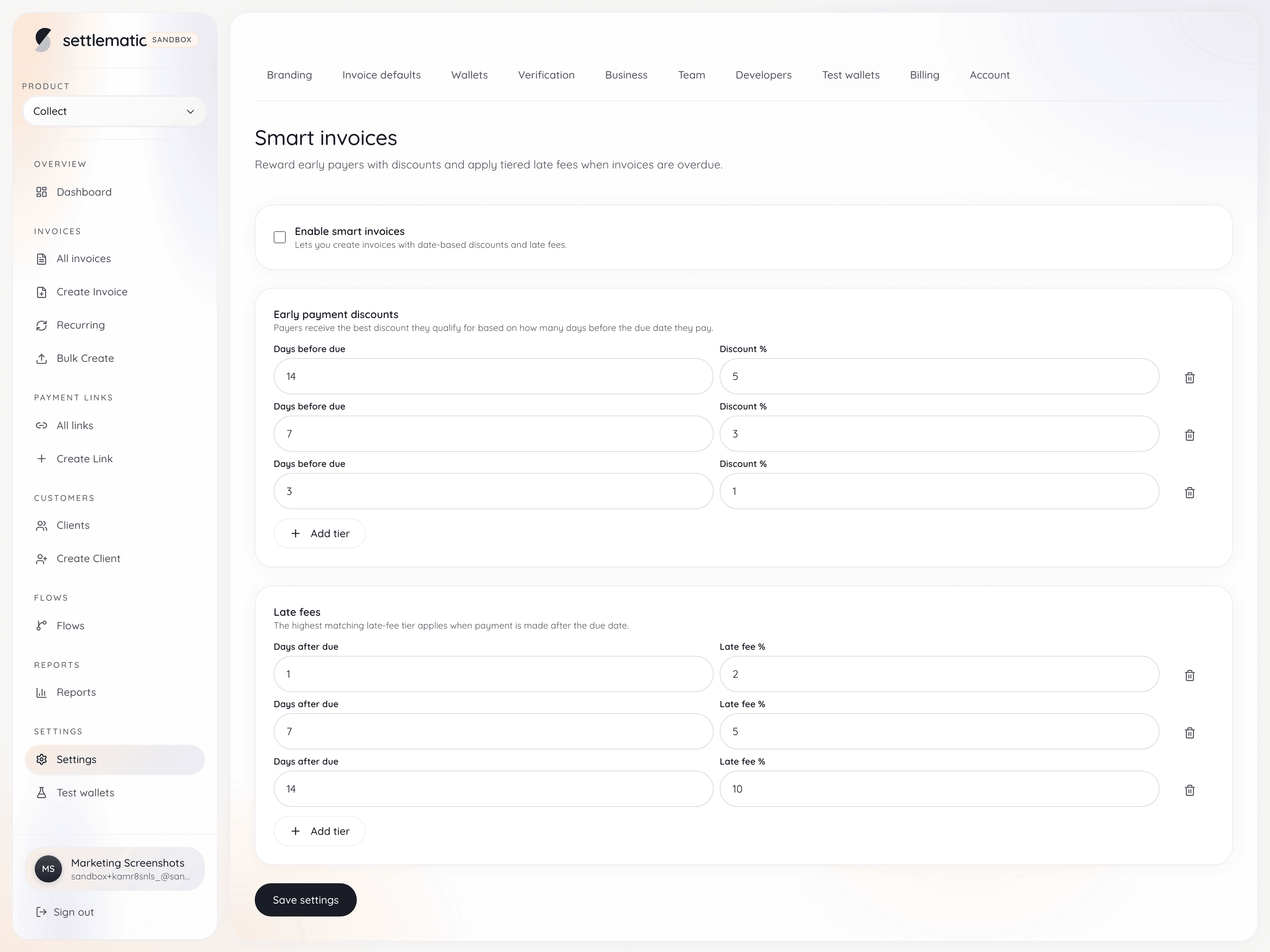
Smart invoices apply tiered early-payment discounts and late fees based on calendar days from the due date. Configure org defaults once, toggle per invoice, and show the same adjustment on pay pages, PDFs, and receipts.
Payment terms must be machine-readable
Traditional invoices print "2/10 net 30" in the footer. AP software ignores it; payers forget it; finance manually calculates discounts in spreadsheets. Smart invoices bind terms to the payment experience:
- Discounted amount before early deadline
- Standard amount after discount window
- Late fee accrual after due date
- Visible on hosted pay page and API/webhooks
Without machine-readable terms, crypto's speed advantage does not improve collections.
Early payment discounts in crypto
Example: 2% discount if paid within 10 days, net 30.
| Day | Pay page shows | Webhook term_state |
|---|---|---|
| 1–10 | 98% of fiat quote in USDC | early_window |
| 11–30 | 100% quote | standard |
| 31+ | 100% + late fee | late |
Crypto settlement does not change the economics — it changes how fast payment can arrive once AP approves. Discounts incentivize using that speed.
Late fees and crypto culture
Late fees are legally sensitive — specify in contract and invoice. Smart invoices display accruing late fees; enforcement remains your commercial policy (service suspension, interest, collections).
Settlematic does not custodially seize funds for fees — amounts due update on pay page; payer sends correct total on-chain.
Non-custodial terms without escrow
Custodial models could theoretically hold escrow for disputes. Non-custodial smart invoices instead rely on:
- Clear hosted pay amounts
- Webhook records of what was offered vs paid
- AR follow-up for underpayment
You keep settlement sovereignty. Custodial vs non-custodial.
Fiat quote + crypto amount dynamics
Terms apply to fiat-quoted invoice totals. Rate lock interacts with discount windows:
- Lock FX for payment window
- Discount reduces fiat total before crypto conversion
- Webhook reports fiat and crypto satisfied amounts
International billing for FX policy.
Partial payments vs terms
If policy allows partial pay, define whether discounts apply only on full settlement. Smart invoices can keep invoice open until cumulative on-chain payments meet discounted threshold.
Invoice-scoped addresses identify which invoice receives partial flows — address guide.
Webhook fields for finance
Include in integration spec:
- term_type: early | standard | late
- amount_due_fiat
- amount_due_crypto
- discount_percent
- late_fee_applied
- due_at, discount_deadline_at
Finance can auto-post discount taken GL entries.
Hosted pay page UX
Show three numbers clearly:
- Pay today (discounted)
- Pay by due date (standard)
- After due date (with late fee)
Countdown timers reduce "I didn't know" disputes. Request demo to see live term transitions.
Industry examples
SaaS annual prepay — 10% discount if USDC received before contract start. SaaS guide.
Agency retainers — 5% discount for quarterly USDC prepay. Agency guide.
Consulting milestones — net 15 with 1% late fee per month statement in MSA.
Template vs smart invoice
Crypto invoice template can print terms in prose; smart invoices enforce them in UX. Use both: PDF for legal archive, hosted link for settlement.
Platform comparison
Not all crypto invoicing tools encode terms. When evaluating best platforms 2026, ask for discount/late-fee demo on hosted page.
Settlematic includes smart terms in Settlematic Collect with flat pricing.
USDC B2B collections
USDC's speed makes early discounts meaningful — payment can land same day AP approves. USDC invoicing tools.
Audit and disputes
Hash-chained audit logs plus on-chain tx hashes prove what amount was offered at payment time. Disputes shift from "your PDF said" to timestamped pay page state.
Implementation checklist
- Legal approves discount/late-fee language in MSA
- Configure default terms in invoicing profile
- Override per invoice when needed
- Map webhook term fields to ERP
- Train CS on underpayment after late fee display
Bottom line
Smart invoices turn payment terms from decorative text into executable billing logic — compatible with non-custodial USDC/USDT settlement. Settlematic Collect | pricing | demo
Extended analysis: operational depth (1)
| Review checkpoint | Pass criteria |
|---|---|
| Custody | Vendor cannot sign merchant settlement txs |
| Addresses | Unique per invoice, never reused |
| Pricing | No uncapped % of volume on large tickets |
| Chains | Matches payer withdrawal options |
| Terms | Discounts/late fees on pay page if needed |
Extended analysis: operational depth (2)
| Review checkpoint | Pass criteria |
|---|---|
| Custody | Vendor cannot sign merchant settlement txs |
| Addresses | Unique per invoice, never reused |
| Pricing | No uncapped % of volume on large tickets |
| Chains | Matches payer withdrawal options |
| Terms | Discounts/late fees on pay page if needed |
Extended analysis: operational depth (3)
| Review checkpoint | Pass criteria |
|---|---|
| Custody | Vendor cannot sign merchant settlement txs |
| Addresses | Unique per invoice, never reused |
| Pricing | No uncapped % of volume on large tickets |
| Chains | Matches payer withdrawal options |
| Terms | Discounts/late fees on pay page if needed |
Frequently Asked Questions
Are late fees automatically collected?
No — pay page shows amount due; payer sends on-chain total per policy.
Can discounts stack with coupons?
Configure per product rules in Settlematic Collect.
Do terms work on Bitcoin invoices?
Yes — terms apply to fiat quote; BTC amount computed per rate lock.
What if payer sends wrong amount?
Webhook shows shortfall; invoice stays open or partial per settings.
Enterprise AP compatibility?
Hosted page shows unambiguous totals; export PDF for portal upload.
See it live?
demo.
Frequently asked questions
- Can I use different tiers on different invoices?
- Tiers are snapshotted from your org settings when each smart invoice is created. To change tiers going forward, edit your org defaults before creating new invoices. Existing open smart invoices keep the tiers they were created with.
- What happens if a client pays exactly on the due date?
- If no early or late tier matches that calendar day, the base invoice total applies with no adjustment. The pay page reads Pay by due date - no adjustment.
- Do smart invoices work with partial payments?
- Yes. Each payment reduces the smart-adjusted balance due, and the adjustment is recalculated using the payment date when each tranche is recorded.
- Is the adjustment based on business days or calendar days?
- Calendar days, counted relative to the due date.
- Can I turn smart pricing off after creating an invoice?
- Yes. Any unpaid invoice can switch back to standard pricing by disabling smart mode in the invoice builder's Payment step.