Custom Branding for Crypto Invoices: Logos, Colors, and Client-Facing PDFs
Learn how to brand crypto invoices with logos, colors, and professional PDFs that build trust with US and EU clients while staying compliant.
Do this next
Create a crypto invoice
- Quote the invoice in fiat.
- Client pays USDC, USDT, or EURC.
- Funds settle to a wallet you already control.
TL;DR
Custom branding applies your logo and colors to hosted pay pages and PDF exports so crypto checkout feels like your company, not a generic gateway.
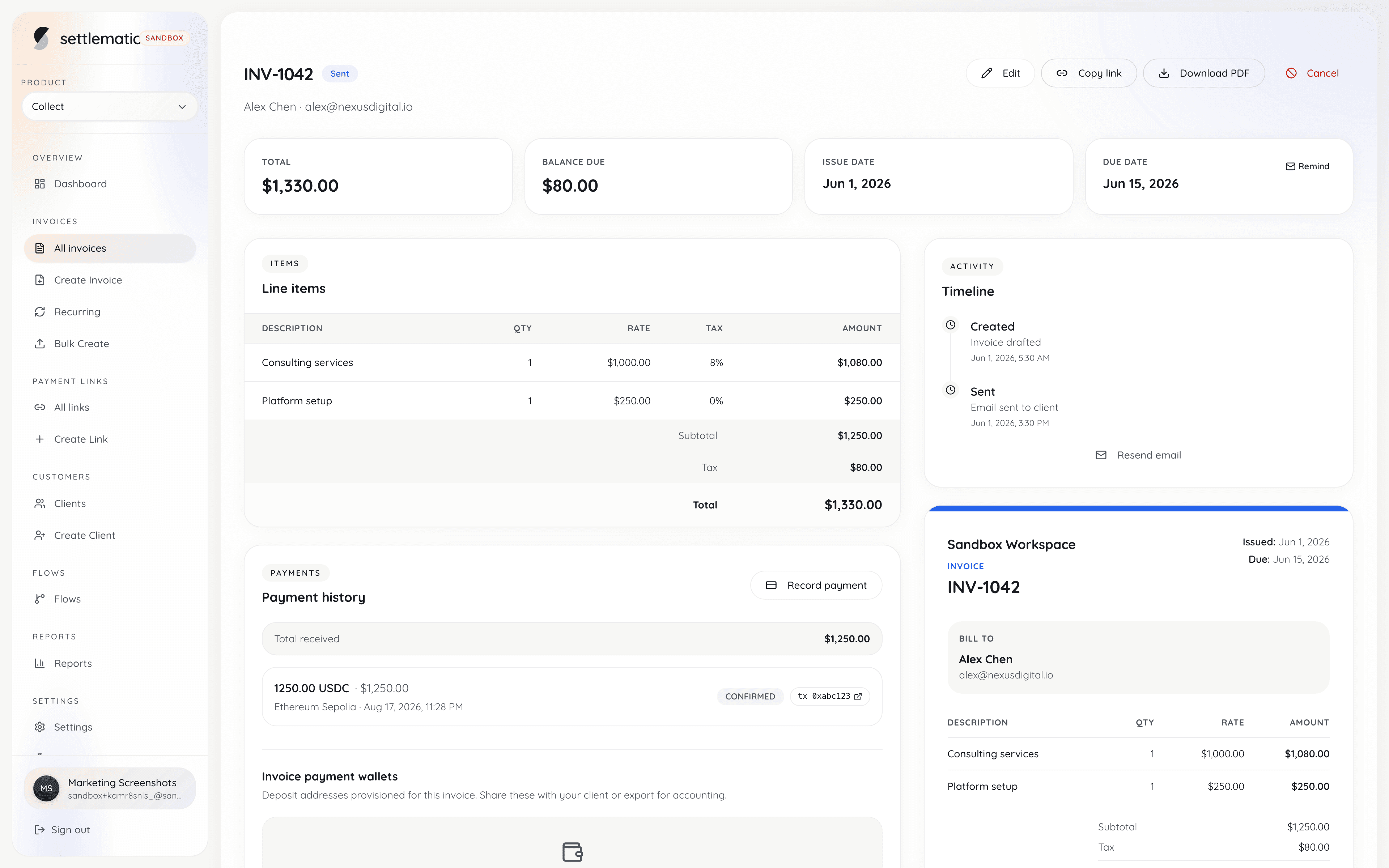
Custom branding for crypto invoices means applying your company's visual identity—logo, colors, fonts, and layout—to every client-facing touchpoint in the payment flow, from the invoice PDF your accountant receives to the hosted payment page where they send USDC or SOL. In 2026, as more B2B freelancers and agencies accept digital assets, branded invoices reduce payment friction because clients trust documents that look like the rest of your business correspondence rather than anonymous blockchain requests.
Why Branding Matters More for Crypto Invoices Than Card Payments
When a client pays by credit card, they interact with a familiar checkout pattern: merchant name, amount, card fields. Crypto payments invert that familiarity. Your client sees a wallet address, a network name, and a token symbol—concepts many finance teams still find foreign. Branding bridges that gap.
A well-branded crypto invoice accomplishes three things simultaneously. First, it confirms the payment request is legitimate and originated from your organization, reducing the risk of phishing or man-in-the-middle scams where attackers substitute their own address. Second, it positions crypto as a normal payment rail alongside wire and ACH, not a workaround. Third, it satisfies internal procurement requirements at larger clients, where accounts payable often requires vendor invoices to match corporate records.
Research from B2B payment surveys consistently shows that invoice presentation affects days-sales-outstanding (DSO). While crypto settlement can be near-instant on chains like Solana, the invoice itself still drives when the client initiates payment. A professional PDF with your logo, invoice number, line items, and clear crypto payment block gets processed faster than a plain-text email with a bare address.
Core Branding Elements for Crypto Invoices
Every branded crypto invoice should include a consistent set of visual and informational elements. Treat these as your brand kit for billing.
Logo placement and sizing
Your logo belongs in the header of both PDF invoices and hosted payment pages. Use a high-resolution PNG or SVG with a transparent background. Recommended minimum width: 120px for web, 300dpi equivalent for print-ready PDFs. Place the logo top-left or centered above the invoice title, matching how you brand PDF invoices for traditional payment methods.
Color palette
Define a primary brand color for headers, accent lines, and call-to-action buttons on payment pages. Define a secondary color for table borders and subtle backgrounds. Ensure sufficient contrast for accessibility—WCAG 2.1 AA requires 4.5:1 contrast for body text. Many crypto payment pages default to dark themes; if your brand is light, override those defaults rather than accepting a generic template.
Typography
Stick to one or two font families. Web-safe fallbacks (Inter, system-ui) load fast on payment pages. Embed licensed fonts in PDF exports if your brand guidelines require them. Invoice numbers, amounts, and payment addresses should use monospace or tabular-nums styling so digits align in tables.
Invoice structure
Maintain the same section order your clients expect from QuickBooks or Xero exports: bill-to, ship-to (if applicable), line items, subtotal, tax, total due, payment terms, and payment instructions. The crypto block—network, token, amount, and address or payment link—should appear after the total, never buried in footer fine print.
Client-Facing PDFs: What Finance Teams Need
PDF remains the default artifact for accounts payable. Even when payment happens on-chain, your client's AP clerk files a PDF, matches it to a PO, and posts to their GL. A branded crypto invoice PDF should include:
- Your legal entity name and registered address
- Client name and billing address
- Unique invoice number and issue date
- Payment due date and terms (Net 15, Net 30)
- Itemized services or products with quantities and rates
- Tax lines where applicable (VAT for EU clients, sales tax for US)
- Total amount due in both fiat reference currency and crypto denomination
- QR code linking to hosted payment page (optional but reduces copy-paste errors)
- Footer with support contact and link to your pricing or terms page
The IRS does not mandate a specific invoice format for crypto income recognition, but Publication 334 and general recordkeeping guidance require you to maintain books showing income received. A consistent PDF format with sequential invoice numbers simplifies audit preparation.
Hosted Payment Pages vs PDF-Only Workflows
| Approach | Best for | Branding control | Client friction |
|---|---|---|---|
| Branded PDF + manual address | Low volume, crypto-native clients | High on PDF, none on payment | High—client copies address |
| Branded PDF + hosted pay page | Most B2B use cases | High on both | Low—click link, pay in wallet |
| API-embedded checkout | SaaS and platforms | Full white-label | Lowest—stays in your app |
| Unbranded generic link | Avoid for professional services | None | Highest—looks like phishing |
Settlematic Collect supports branded hosted payment pages where your logo, colors, and company name appear alongside chain-specific payment instructions. Funds settle directly to your wallet—no custodial intermediary—while the client sees a page that matches your brand.
Designing for Multi-Chain Branding Consistency
If you accept USDC on Ethereum, Base, and Solana, branding must stay consistent while payment instructions change per chain. Use a single invoice template with a dynamic payment section that updates based on the selected or assigned network.
Best practices:
- Show the network name prominently (e.g., "Pay on Solana Mainnet")
- Display the token symbol and contract address for ERC-20 tokens on EVM chains
- Include a warning block: "Send only [TOKEN] on [NETWORK]. Other assets may be lost."
- Use network-colored accents sparingly—your brand colors should dominate; chain colors are informational only
Cross-link related guides like what-is-non-custodial-crypto-invoicing in your client onboarding emails so finance teams understand why payment goes to a unique address rather than your main wallet.
Email Notifications and Brand Extension
Branding does not stop at the PDF. Payment request emails, confirmation emails, and overdue reminders should use the same logo, colors, and tone. Include:
- Plain-text fallback with payment link
- HTML version with branded header
- Unsubscribe link for marketing compliance (CAN-SPAM, GDPR)
- No attachment of private keys or seed phrases—ever
Settlematic sends payment-status webhooks you can use to trigger branded emails from your own ESP, keeping full control of copy and design while the platform handles on-chain verification.
Compliance Considerations for US and EU Clients
EU clients operating under MiCA and national VAT rules expect invoices that meet Directive 2006/112/EC requirements where applicable: supplier identity, VAT number, taxable amount, and rate. US clients may need W-9 or W-8BEN on file before first payment. Branding does not replace compliance fields—it makes them more readable.
For EU B2B reverse-charge scenarios, include the required legal language in a branded footer block. For US 1099 reporting, ensure your invoice PDFs show your TIN or business name as it appears on tax filings. Custom branding templates should have locked compliance fields that editors cannot accidentally remove.
White-Label and Agency Use Cases
Agencies billing multiple clients under their own brand need white-label crypto invoicing: the end client sees the agency's logo, not the platform's. This matters for client retention—if your client realizes you're using a third-party tool, that's fine; if they think they're paying a random crypto gateway, trust erodes.
White-label requirements:
- Custom domain for payment pages (pay.youragency.com)
- Removal of platform branding from footers
- Custom email sender domain (SPF/DKIM configured)
- Per-client or per-project invoice numbering schemes
Book a demo to see how Settlematic handles agency-grade branding without taking custody of client funds.
Common Branding Mistakes to Avoid
- Hiding the crypto instructions. Branding the header beautifully but shrinking payment details to 8pt gray text causes wrong-chain payments. See our guide on crypto-invoice-paid-wrong-chain for recovery steps.
- Inconsistent amounts. PDF shows $5,000 USD; payment page shows 4,998.50 USDC due to FX—always explain rounding or use fixed crypto amounts at invoice creation.
- Low-contrast QR codes. Test QR codes on both screen and print; minimum quiet zone per ISO/IEC 18004.
- Stock crypto imagery. Generic bitcoin logos on a Solana USDC invoice confuse clients. Use token and network icons that match the actual payment rail.
- Ignoring mobile. Half of wallet users pay from phones. Responsive payment pages are non-negotiable.
Integrating Branded Invoices with Accounting Exports
Branded PDFs are client-facing; your books need structured data. Export invoice metadata—number, date, amount, token, tx hash, network—to QuickBooks or Xero. Our guide on export-crypto-invoice-data-quickbooks-xero covers CSV and API patterns.
Settlematic attaches on-chain payment proof to each invoice record, so your exported data includes verification hashes alongside branded document references.
Building a Brand Review Checklist Before Go-Live
Before sending your first branded crypto invoice to a US or EU enterprise client, run through this checklist:
- Logo renders correctly on PDF and web (light and dark backgrounds)
- Invoice number sequence matches accounting system
- Legal entity name matches bank and tax records
- Payment page shows correct network and token
- Test payment on testnet or small mainnet amount
- Confirmation email matches brand guidelines
- AP contact can reach support via branded footer link
- Exported data reconciles in accounting software
Accessibility and Inclusive Design for Payment Pages
Branded crypto invoices must remain readable for all clients, including finance staff using screen readers and AP teams reviewing documents on mobile devices during commute. WCAG 2.1 AA compliance is not merely a legal checkbox for public-sector vendors—it reduces payment errors when instructions are clear at any font size. Use semantic HTML headings on hosted payment pages so screen readers announce "Payment instructions" before the network name. Provide alt text for your logo that includes your company name, not "logo.png." Ensure color is not the only indicator of payment status; pair green "Paid" badges with text labels. PDF exports should use tagged PDF structure where your export pipeline supports it. High-contrast mode overrides help clients with low vision confirm they are sending USDC on Base rather than Ethereum. Settlematic payment page templates support accessible defaults while preserving your brand palette within contrast-safe bounds.
Measuring Brand Impact on Payment Velocity
Track branded invoice performance against a baseline period before crypto rollout. Metrics worth monitoring include time from invoice send to first on-chain detection, support ticket rate per hundred invoices, and wrong-chain payment frequency. A/B testing is rare in B2B invoicing but possible: half your clients receive minimalist unbranded payment links while half receive fully branded PDF plus hosted page; compare DSO after controlling for client size and industry. Agencies reporting 15–20% faster payment on branded crypto invoices versus plain address emails cite reduced "is this legitimate?" delays in AP review. Document findings for internal ROI conversations when renewing Settlematic Collect subscriptions—see pricing for plan tiers that include analytics.
Seasonal and Campaign-Specific Brand Variants
Some businesses maintain seasonal logo variants or campaign-specific color accents. Your crypto invoice branding should support at least one alternate header graphic without breaking payment instruction layout—holiday branding must not shrink the network warning block. Store campaign assets in Settlematic organization settings with effective date ranges if your workflow supports scheduled template rotation. Revert to standard branding automatically after campaign end so Q1 invoices do not carry outdated promotional headers that confuse enterprise AP clerks archiving documents for seven-year retention periods aligned with IRS and EU audit norms.
Localization for international client branding
US and EU clients expect different compliance blocks on branded invoices — visual brand stays consistent; legal footer adapts:
| Element | US invoice footer | EU invoice footer |
|---|---|---|
| Tax ID | EIN / SSN business | VAT number |
| Reverse charge | N/A (domestic) | Required text for B2B cross-border |
| Currency display | USD primary | EUR primary optional |
| Payment instructions | USDC on Base/Solana | USDC/EURC on Polygon |
| Support contact | US business hours | UTC hours noted |
Hosted payment pages should detect locale for date formatting (MM/DD vs DD/MM) while keeping network warnings in unambiguous English — "Solana Mainnet" not ambiguous abbreviations.
RTL languages (Arabic, Hebrew) for client name fields require PDF export testing — payment instruction block stays LTR for wallet address readability.
Brand trust signals beyond logo placement
Sophisticated B2B clients evaluate legitimacy through subtle signals:
- Consistent domain — Payment link on pay.yourcompany.com, not generic subdomain.
- Matching email sender — [email protected] with SPF/DKIM aligned to corporate domain.
- Invoice number sequence — Gapless numbering; INV-2026-0042 following INV-2026-0041.
- Legal entity match — Invoice header matches contract signatory exactly.
- Support response SLA — Branded footer promises 24-hour AP support; deliver it.
Phishing attacks target crypto invoices specifically — attackers replicate layout without legitimate domain. Train clients to verify payment link domain before sending funds. Include domain verification note in first invoice email.
PDF generation quality standards
Export PDFs meeting enterprise AP archival requirements:
- Resolution — 300 DPI for logo embedding; vector logo preferred.
- File size — Under 2MB for email attachment limits.
- Fonts — Embed subset fonts; avoid missing glyph issues for client names with diacritics.
- Pagination — Line items paginate cleanly; payment block never splits across pages awkwardly.
- Print test — QR code scannable from laser-printed copy (AP often prints before paying).
| Quality check | Pass criteria |
|---|---|
| Logo clarity | Readable at 100% zoom |
| QR scan from screen | <3 seconds to open payment page |
| QR scan from print | Works at 8.5×11 grayscale |
| Amount legibility | 12pt minimum for total due |
| Network warning | High contrast, ≥14pt |
Poor PDF quality undermines otherwise excellent branding — finance teams distrust blurry documents.
Frequently asked questions
- Can I use my existing QuickBooks invoice template for crypto?
- You can reuse layout and branding, but you must add a crypto payment section with network, token, and address or payment link. QuickBooks native crypto support is limited; most teams use a dedicated platform like Settlematic for on-chain settlement and export summaries to QuickBooks.
- What file format should I send clients?
- PDF is standard for AP workflows. Some clients also want the hosted payment link in the email body for one-click wallet payment. Offer both.
- Do branded crypto invoices help with IRS audits?
- Consistent, numbered, professional invoices support the IRS recordkeeping expectation that you can substantiate income. Branding itself is not a legal requirement, but organized documentation is.
- Should I brand differently for US vs EU clients?
- Visual brand stays the same; compliance fields differ. EU invoices may need VAT IDs and reverse-charge notes; US invoices may need different tax line treatment.
- Can I embed video or animations on payment pages?
- Minimal motion is fine for loading states; avoid autoplay video that distracts from payment instructions or slows page load on mobile wallets' in-app browsers.
- How does Settlematic handle branding without custody?
- You upload brand assets to your Settlematic organization settings. Invoices and payment pages render your branding while settlement addresses are derived non-custodially—funds never pass through Settlematic wallets. Explore Settlematic Collect for details.